3D Floral Wall Art Laser Cut Flowers
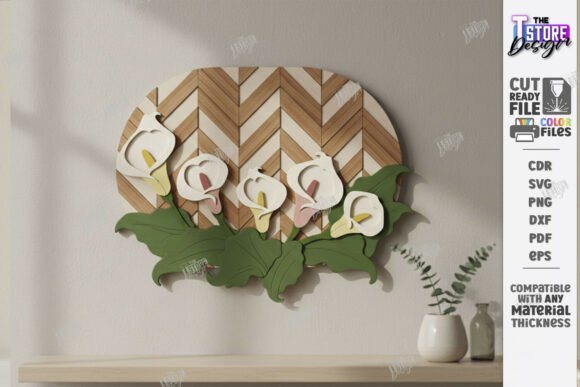
Transforming a flat digital design into a tangible, multi-dimensional piece of home decor requires precision, creativity, and the right tools. 3D Floral Wall Art Laser Cut Flowers represent a significant step up from standard single-layer wall hangings. By utilizing layered designs featuring sunflowers, tulips, roses, calla lilies, and peonies, creators can produce botanical displays that catch light differently depending on the viewing angle. This depth adds a sophisticated, organic feel to any space, making it an excellent choice for spring-themed decor or year-round botanical accents.
The process involves more than just cutting wood; it is about engineering a visual experience through layering. When you use a CNC file designed for laser cutting machines, you are essentially working with a blueprint for complexity. The key to success lies in understanding how these files function within your specific software ecosystem and hardware setup. Whether you are a hobbyist looking to add unique flair to your living room or a small business owner aiming to sell high-margin decor items, mastering this format can elevate your output significantly.
Understanding the Layered Design Structure
At the core of this product is the concept of stratification. Unlike a simple silhouette, a 3D floral arrangement relies on multiple distinct layers stacked to create volume. The design typically includes a base layer, followed by progressively smaller or detailed layers that form the petals and leaves of flowers like the geometric wood wall hanging botanical style. This structure allows for shadows and highlights to play across the surface, mimicking the natural irregularity of real flowers.
To achieve this effect, the digital file uses color-coded lines to instruct the machine. In this specific cut file, the red line indicates where the machine should CUT, separating the individual pieces from the main sheet of material. Conversely, the black line indicates where the machine should ENGRAVE, adding texture or detail without removing material. Understanding this distinction is crucial. If you confuse the two, you may end up with fragmented pieces lacking the necessary surface details or a solid block that hasn’t been separated at all.
Material Selection and Compatibility
Before sending the file to your laser cutter, selecting the appropriate material is vital. While this design is optimized for wood, not all woods behave identically under a laser. Basswood and birch plywood are popular choices because they cut cleanly and accept engraving well. However, thicker materials may require multiple passes or higher power settings, which can alter the fit of the layers if not accounted for during assembly.
It is also important to ensure your cutting machine and software are compatible with the provided formats. Most modern laser cutters handle SVG, DXF, and EPS files natively. However, vector scaling issues can arise when importing files into certain environments. For instance, some users report dimensional distortions when using SVG files in Lightburn software. To mitigate this risk, the package includes a DXF file as a reliable alternative. Using the DXF format often yields better results regarding dimension accuracy, ensuring that your layers fit together seamlessly without gaps or overlaps.
Technical Workflow and File Management
Receiving the digital download is straightforward, but managing the assets correctly is where many projects succeed or fail. The zip archive contains five distinct file types: one SVG, one EPS, one PNG, one PDF, and one DXF. Each serves a different purpose in the workflow:
- SVG (Scalable Vector Graphics): Ideal for most vector-based design software. It allows for easy resizing without losing quality, though, as noted, potential distortion in Lightburn should be monitored.
- DXF (Drawing Exchange Format): Recommended for Lightburn users due to its superior handling of dimensions and layer structures. This is often the safest bet for precise cutting operations.
- EPS (Encapsulated PostScript): A robust format compatible with Adobe Illustrator and other professional design suites, useful if you need to manipulate the vectors extensively before cutting.
- PNG (Portable Network Graphics): A raster image useful for previewing the design or for non-vector processes like vinyl cutting or printing, though it lacks the infinite scalability of vector files.
- PDF (Portable Document Format): Useful for reference, sketching, or manual tracing if you do not have immediate access to vector editing software.
If you find yourself needing a different file type, such as a specific color variant of the PNG or a custom size, direct communication with the creator is encouraged. Being proactive about file requirements can save hours of troubleshooting later in the production cycle.
Assembly and Creative Application
Once the pieces are cut and engraved, the assembly phase brings the 3D Floral Wall Art Laser Cut Flowers to life. The challenge here is alignment. Because the layers must stack perfectly to maintain the intended geometric aesthetic, even a millimeter of misalignment can disrupt the visual flow of the sunflower or tulip design. Using double-sided tape, glue dots, or small wooden spacers between layers can help maintain consistent spacing, enhancing the three-dimensional effect.
This versatility makes the design suitable for various applications beyond just wall art. It can serve as a decorative door hanger, adding a welcoming touch to a front porch during the spring season. Alternatively, it can be mounted as a centerpiece for a dining table or used as a backdrop for photography. The geometric nature of the wood cutting allows it to blend well with both rustic farmhouse styles and modern minimalist interiors.
Considerations for Commercial Use
For entrepreneurs and makers, this digital asset offers a low-barrier entry into the physical product market. Since it is a digital download, there is no inventory cost until you produce the item. This model supports lean manufacturing principles, allowing you to test demand without significant upfront investment. However, it is essential to consider the time investment in assembly. A multi-layered flower sign takes longer to assemble than a single-layer plaque. Factor this labor into your pricing strategy to ensure profitability.
Furthermore, while the file is Glowforge ready, compatibility with other brands like xTool, Omtech, or generic CO2 lasers depends on your machine’s resolution and power. Always run a test cut on scrap material first. This practice helps you verify the speed and power settings required for your specific wood thickness, preventing wasted material and protecting your machine’s lens from excessive debris.
Why This Approach Matters for Home Decor
In an era where mass-produced decor dominates the market, handmade laser-cut items offer a sense of authenticity and care. 3D Floral Wall Art Laser Cut Flowers allow homeowners and renters to personalize their spaces with intricate designs that would be difficult or expensive to commission manually. The ability to choose your own wood type—whether light maple for a soft look or dark walnut for contrast—adds another layer of customization.
Moreover, the educational value of working with these files cannot be overstated. For beginners in laser cutting, this project serves as an excellent introduction to layering techniques. It teaches patience, precision, and problem-solving skills. For experienced users, it provides a quick turnaround project that showcases advanced capabilities without requiring complex CAD modeling from scratch.
As you explore your options, remember that the best results come from matching the tool to the task. If you are using Lightburn, stick to the DXF file. If you are using CorelDRAW or Illustrator, the SVG or EPS files will likely work flawlessly. By paying attention to these technical details, you ensure that the final product reflects the beauty of the original design.
Final Thoughts on Execution
Creating stunning wall decor is as much about preparation as it is about execution. By leveraging the included resources—the comprehensive zip archive, the clear cut/engrave instructions, and the flexible file formats—you position yourself for success. Whether you are decorating your own home or building a brand around unique botanical art, the 3D Floral Wall Art Laser Cut Flowers design provides a robust foundation.
Keep in mind that experimentation is part of the creative process. Don’t hesitate to reach out with questions or requests for specific file variations. Engaging with the community and staying open to feedback can lead to unexpected innovations. As you follow future releases and updates, you will find that continuous learning and adaptation are key to staying ahead in the dynamic world of digital fabrication and home decor.