3D Memorial Lantern Laser Cut Files
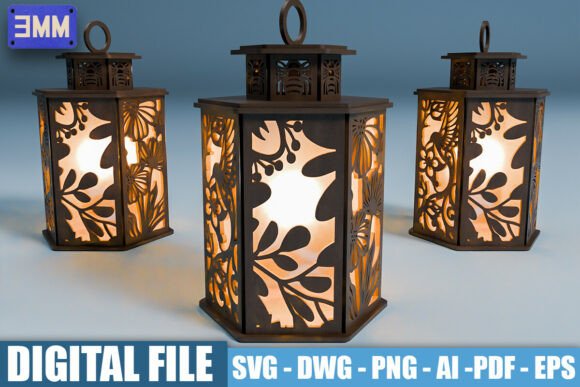
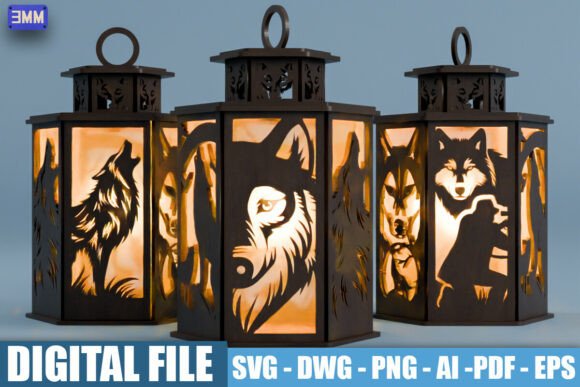
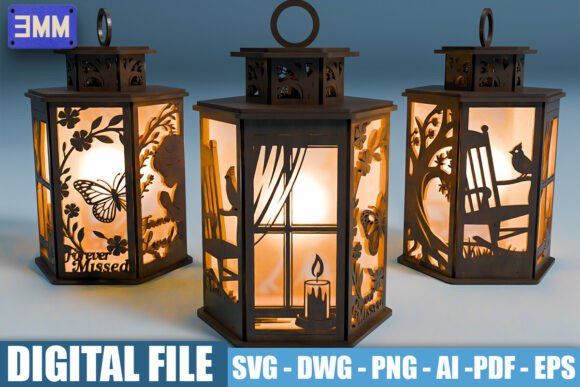
Creating a lasting tribute to a loved one is an emotional process, and finding the right medium can make all the difference. 3D Memorial Lantern Laser Cut Files offer a sophisticated, heartfelt way to honor memories through light and shadow. These digital downloads provide everything needed to construct a hexagonal lantern featuring unique scenes of remembrance, such as a rocking chair with a cardinal, a window with a flickering candle, or a butterfly inscribed with "Forever Missed." While the concept is simple—download, cut, assemble—the execution requires attention to detail to ensure the final piece is both structurally sound and visually stunning.
For hobbyists, small business owners, and professional laser cutters alike, these files represent more than just a craft project; they are a tool for creating meaningful decor. However, navigating the technical aspects of laser cutting can be tricky if you are not prepared. Many users overlook critical details regarding material compatibility and file optimization, leading to frustration rather than fulfillment. This guide aims to help you avoid common pitfalls and achieve a high-quality result that truly reflects the sentiment behind the design.
Understanding the File Formats and Compatibility
One of the first things to consider when purchasing digital laser cut files is format compatibility. The package typically includes a variety of formats: SVG, DXF, AI, EPS, PDF, and PNG. Each serves a specific purpose, and understanding which one to use is crucial for a smooth workflow.
- SVG (Scalable Vector Graphics): This is often the preferred format for modern laser cutting machines. It ensures clean, precise cuts because it relies on vector paths rather than pixels. If your software supports SVG natively, this is usually your best starting point.
- DXF: A standard for 2D drawings, DXF files are compatible with a wide range of CAD and laser cutting software. They are reliable but may require some cleanup in your specific software environment to ensure lines are closed and ready for cutting.
- AI (Adobe Illustrator) & EPS: These formats offer full editability. If you need to resize the lantern significantly or tweak minor details before cutting, having the editable source files is invaluable. Note that resizing vector graphics is lossless, but always double-check layer settings after importing.
- PDF & PNG: While useful for viewing or printing reference images, these are raster-based or complex vector hybrids that may not cut directly on many lasers without conversion. Use them primarily for visualization or if your machine specifically supports PDF cutting workflows.
A common mistake is assuming all files will work identically across all software versions. Always open the file in your intended program first to verify that layers are organized correctly and that no elements are locked or hidden unexpectedly. This pre-flight check saves hours of troubleshooting later.
Material Selection and Thickness Matters
The specifications for these memorial lanterns indicate compatibility with 3mm material thickness. This is a critical constraint. Using material that is too thin, such as 1.5mm basswood or cardboard, may result in a fragile structure that cannot support its own weight or withstand assembly stress. Conversely, using material thicker than 3mm, like 4mm acrylic or plywood, will prevent the tabs from fitting into the slots, rendering the design unusable without significant re-engineering.
When selecting wood, consider the grain direction. For aesthetic consistency, align the grain so it runs vertically along the panels. This not only looks better but also affects how the laser interacts with the material. Hardwoods like maple or birch provide a smooth finish, while softer woods like pine may char more easily during engraving. If you plan to engrave text or detailed imagery, test a small section first to adjust power and speed settings accordingly.
Avoiding Assembly Errors
Even with perfect cuts, assembly can go wrong if the tolerance between tabs and slots is ignored. Laser cutters vary in their kerf width—the amount of material removed by the laser beam. If your machine has a wider kerf than the one used to create the file, the joints may be loose. To correct this, you can either add shims (small pieces of paper or thin cardboard) inside the joints or slightly increase the cut power to narrow the slot. On the other hand, if the fit is too tight, you risk breaking the delicate tabs during insertion. In such cases, reducing the cut power slightly or using a finer tip can help achieve a snug but manageable fit.
Design Details That Enhance Sentiment
The beauty of these lanterns lies in their narrative elements. The inclusion of symbols like cardinals, butterflies, and candles adds layers of meaning. When preparing your files, pay close attention to the distinction between cut lines and engrave lines. Typically, cut lines are solid vectors, while engravings might be represented by halftones, dithering patterns, or separate color channels.
A frequent oversight is failing to separate these operations in your slicing software. If you send the entire file as a single cut job, the laser will try to slice through the engraved areas, potentially damaging your material or creating unwanted holes. Ensure your software allows you to assign different power and speed settings to different colors or layers. For instance, use lower power for engraving delicate features like feather details on a cardinal, and higher power for cutting the structural outline.
Considerations for Creators and Sellers
If you are a small business owner looking to sell assembled lanterns or kits, quality control is paramount. Customers expect a premium feel, especially for memorial items. Inspect each panel for residual ash or scorch marks, particularly around intricate engraving areas. Light sanding or wiping with a damp cloth can often remove surface residue, restoring the natural look of the wood.
Additionally, consider packaging. Since these are gifts or personal keepsakes, presentation matters. Include a small card explaining the symbolism of the designs—a rocking chair representing rest, a cardinal symbolizing messages from heaven. This educational touch enhances the perceived value and provides comfort to the recipient. It transforms a simple wooden object into a curated experience.
Final Checks Before You Cut
Before committing your entire sheet of material to the laser bed, always perform a test run. Cut a single panel at reduced power to verify dimensions and fit. Check that the "Forever Missed" text is legible and not blurred by excessive heat. Verify that the hexagonal geometry holds together without gaps. By taking these precautions, you protect your materials and ensure that the final product is a dignified and durable tribute.
Ultimately, 3D Memorial Lantern Laser Cut Files are a powerful resource for anyone wishing to combine technical skill with emotional expression. By respecting the technical requirements—file formats, material thickness, and assembly tolerances—you can create a beautiful, heartfelt piece that honors loved ones with grace and precision. Whether for personal use or as part of a creative enterprise, attention to detail ensures that the message of remembrance shines through clearly.