Mastering the Art of Depth: A Comprehensive Guide to the 3D Christmas Deer Shadow Box SVG
The holiday season brings with it a unique set of creative challenges and opportunities. For crafters, designers, and DIY enthusiasts, the goal is often to create something that feels both traditional and innovative. One of the most striking ways to achieve this balance is through layered paper art, specifically using designs like the 3D Christmas Deer Shadow Box SVG. This technique transforms flat sheets of material into dimensional artworks that catch the light, cast shadows, and add a sense of realism to any festive display.
Understanding how to work with digital cut files for complex projects requires more than just having the right machine; it requires an understanding of design structure, material properties, and workflow efficiency. This guide explores the intricacies of creating 3D shadow boxes, focusing on the specific characteristics of the deer design, the technical specifications of the file formats provided, and practical tips for achieving professional results.
Understanding the Design Architecture
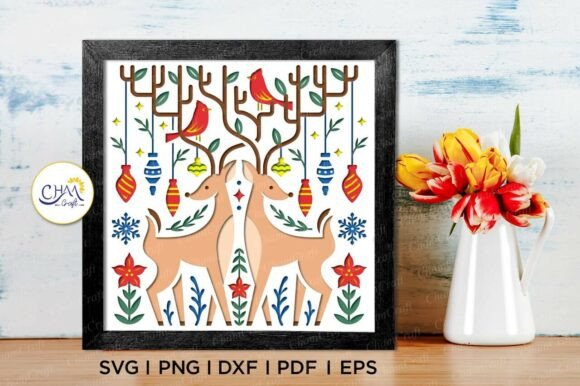
At its core, a shadow box design relies on the principle of parallax. By separating different elements of an image into distinct layers and spacing them apart, you create depth. The 3D Christmas Deer Shadow Box SVG is engineered with this in mind. It is not merely a single silhouette but a collection of overlapping shapes that, when assembled correctly, form a cohesive three-dimensional scene.
The design measures 8×8 inches, a standard size that fits well within most cutting mat limitations while providing enough surface area to showcase intricate details. However, the dimensions are flexible. While you can easily resize the design to fit larger frames or smaller displays, caution is advised when scaling down. As the overall size decreases, the fine details—such as the texture of the antlers or the delicate branches in the background—may become too small for standard blade settings to cut cleanly. In such cases, manual trimming or specialized micro-blades might be necessary.
The Importance of Layer Separation
One of the critical aspects of this template is how the layers are organized. A high-quality 3D Christmas SVG Shadow Box Template will have each layer separated logically. Typically, this includes:
- Background Layers: These are often solid colors or patterns that set the mood, such as a snowy forest or a warm fireplace glow.
- Middle Ground Elements: This includes the main subject, in this case, the deer, along with trees or other environmental features.
- Foreground Details: Small accents like snowflakes, berries, or foreground grass that sit closest to the viewer.
When working with the included files, ensure that your software correctly identifies these separate paths. Merging layers prematurely can lead to a flat final product, defeating the purpose of the 3D effect.
Technical Specifications and File Compatibility
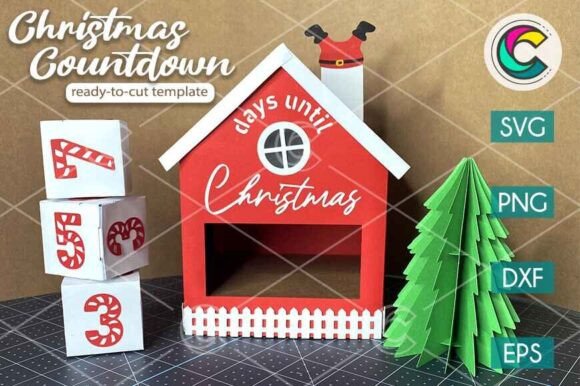
For professionals and hobbyists alike, compatibility is key. The market offers various cutting machines and design software, each with preferred file formats. To ensure broad accessibility, this digital product provides a comprehensive suite of formats, ensuring that whether you use Cricut, Silhouette, or Adobe Illustrator, you have the tools needed to execute the design.
Breakdown of Included Formats
The zipped file received upon purchase contains several variations tailored to different workflows:
- SVG (Scalable Vector Graphics): This is the gold standard for cutting machines. It is compatible with Cricut Design Space and Silhouette Designer Edition. The vector nature of SVGs allows for infinite resizing without loss of quality, making it ideal for precise cutting paths.
- PNG (Portable Network Graphics): Featuring a transparent background, PNGs are excellent for hand-cutting or for users who prefer to trace the design manually in their software. They are also useful for digital printing onto cardstock before cutting.
- DXF (Drawing Exchange Format): Primarily used by Silhouette Studio, this format ensures that even if you do not have the latest version of Cricut software, your Silhouette machine can read the cut lines accurately.
- EPS (Encapsulated PostScript): A versatile vector format that works seamlessly with professional graphic design software like Adobe Illustrator, CorelDraw, and Inkscape. This is particularly useful for designers who want to modify the color palette or add custom text before sending the file to a cutter.
- PDF (Portable Document Format): Universal and easy to view, PDFs serve as a reliable backup. They are ideal for printing the design at home to use as a tracing guide if you prefer manual cutting methods.
- Silhouette Studio File: A native file type for Silhouette users, offering pre-optimized settings that may save time during the setup phase.
Important Note: Since this is a DIGITAL PRODUCT, no physical item will be shipped. Upon purchase, you will receive a zipped file containing the designs. Please extract the files before use. Ensure you understand how to work with these file formats before making a purchase.
Material Selection and Creative Experimentation
The visual impact of a shadow box is heavily dependent on the materials chosen. While the 3D Layered SVG Paper Cut Light Box Compatible with Cricut Silhouette design is versatile, certain materials enhance the 3D effect more than others.
Cardstock and Paper Choices
Standard cardstock is a popular choice due to its rigidity and ease of cutting. However, experimenting with different textures can yield stunning results. Consider using:
- Kraft Paper: For a rustic, natural look that complements the deer theme.
- Vellum: Semi-transparent vellum can be used for background layers to create a soft, glowing effect, especially when paired with a light box.
- Metallized Cardstock: Adding a touch of gold or silver to the antlers or decorative elements can elevate the design from simple to elegant.
Color Theory in Shadow Boxes
Try experimenting with different colors to see how the design transforms. High contrast between layers enhances depth. For instance, a dark blue background with a white or cream-colored deer creates a striking nighttime winter scene. Alternatively, warm tones like deep red and forest green evoke a classic Christmas aesthetic. The flexibility of the EPS and SVG files allows you to recolor elements digitally before cutting, enabling you to test multiple palettes without wasting physical materials.
Assembly Techniques for Professional Results
Cutting the pieces is only half the battle; assembly is where the magic happens. Proper spacing is crucial for maintaining the illusion of depth.
Using Spacers
To achieve consistent layering, many creators use spacers. These can be commercially available foam tape dots or homemade strips of cardboard. Place spacers between each layer as you assemble the box. Start with the back layer, attach the next layer using spacers, and continue until all layers are stacked. This method ensures that the shadows fall naturally and that no two layers touch unintentionally, which would flatten the image.
Lighting Enhancements
The term "Light Box" in the design description hints at one of the most effective ways to display this artwork. Placing an LED strip light behind the shadow box, or using a battery-operated fairy light string within the frame, can illuminate the translucent layers. This not only highlights the details of the deer but also creates a warm, inviting ambiance perfect for holiday decor. When using lights, ensure that the power source is safely hidden and that the heat generated does not warp the paper or plastic components.
Target Audience and Use Cases
This design appeals to a wide range of users, each with distinct needs and applications.
Professional Crafters and Sellers
For those selling handmade goods on platforms like Etsy or at local markets, the 3D Christmas Deer Shadow Box SVG offers a high-value product. The complexity of the design commands a higher price point compared to simple ornaments. Professionals can leverage the multiple file formats to offer customization options to clients, such as changing names or dates on the design.
Educators and Classroom Projects
Educators can use this project to teach students about geometry, spatial reasoning, and artistic composition. The step-by-step nature of assembling layers provides a tangible lesson in how 2D shapes create 3D objects. The clear file formats make it easy for teachers to distribute instructions and templates digitally.
Hobbyists and Home Decorators
For the everyday crafter, this project serves as a rewarding weekend activity. The result is a personalized piece of home decor that adds a unique touch to holiday celebrations. The ability to experiment with colors and materials encourages creativity and skill development.
Considerations and Best Practices
Before beginning your project, keep the following considerations in mind to ensure a smooth experience.
Machine Calibration
Ensure your cutting machine is properly calibrated. Different paper thicknesses require different blade depths and pressures. Test cuts on scrap material are highly recommended to find the optimal settings for your specific brand of cardstock.
Patience and Precision
Removing small pieces from the cut sheet, known as weeding, requires patience. Using tweezers and a sharp pick tool can help retrieve tiny details without damaging the surrounding layers. Take your time during assembly to align the edges perfectly.
Storage and Display
Once completed, store your shadow box in a dry environment away from direct sunlight to prevent fading. If displaying near a window, consider UV-protective glass for the frame to preserve the colors over time.
Conclusion
The 3D Christmas Deer Shadow Box SVG represents more than just a digital file; it is a gateway to creating meaningful, dimensional art. By understanding the technical nuances of the file formats, selecting appropriate materials, and employing careful assembly techniques, creators can produce stunning holiday decorations. Whether you are a seasoned pro looking to expand your product line or a beginner eager to try a new craft, this design offers a rewarding challenge. Remember, since this is a DIGITAL PRODUCT, refunds are not available. If you have any questions, feel free to message me—I aim to respond as quickly as possible to support your creative journey.