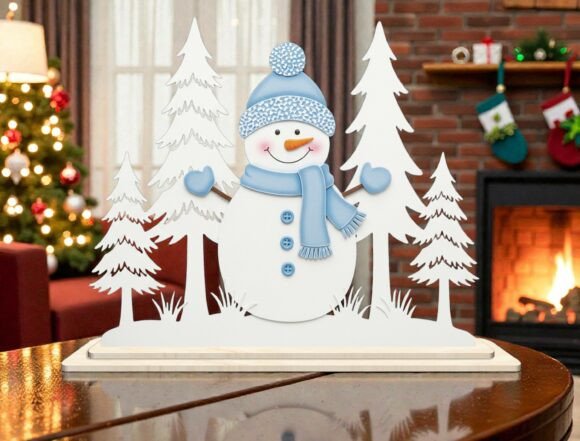
Snowman Winter Scene 3D Laser Cut SVG
Crafting a cohesive holiday display often requires more than just a single decorative element; it demands a structured approach to design, material selection, and assembly. The Snowman Winter Scene 3D Laser Cut SVG serves as a foundational asset in this process, bridging the gap between digital planning and physical execution. For creators, small business owners, and hobbyists alike, understanding how to integrate this specific vector file into a broader workflow is essential for achieving professional-grade results efficiently.
This design is not merely an image but a complex set of instructions for fabrication. It features a layered composition including an adorable snowman wearing a cozy hat, scarf, and mittens, surrounded by snowy pine trees. When processed correctly, these layers assemble into a freestanding decoration that adds depth and visual interest to Christmas table displays, shelf décor, or kids’ rooms. The following sections outline the practical considerations for preparing, cutting, and assembling this project, ensuring consistency and quality in every iteration.
Understanding the Asset Structure
Before initiating any fabrication process, it is critical to analyze the structure of the digital file. The Snowman Winter Scene 3D Laser Cut SVG is provided in multiple formats, including SVG, DXF, DWG, EPS, AI, and PDF. Each format serves a distinct purpose within a creator’s software ecosystem.
- SVG (Scalable Vector Graphics): Ideal for Cricut and Silhouette users, this format ensures smooth curves and precise cut lines that translate well to blade-based machines.
- DXF/DWG: Preferred for CAD environments and many laser cutter interfaces, these formats maintain geometric accuracy for vector-based engraving and cutting.
- EPS/AI: Best for graphic designers who need to manipulate the artwork further before sending it to production.
- PDF: Useful for previewing the design layout and verifying layer separations without opening specialized vector software.
Recognizing which format aligns with your primary tool—whether it is a Glowforge, xTool, OmTech, or a handheld cutter—is the first step in efficient project management. Compatibility issues often arise when files are converted improperly, leading to jagged edges or misaligned layers. Always verify that the downloaded assets open cleanly in your intended software before proceeding to material preparation.
Material Selection and Preparation
The success of a 3D layered design depends heavily on the substrate chosen. Unlike flat decals, this Snowman Winter Scene relies on contrast and structural integrity to create its three-dimensional effect. For laser cutting, materials such as basswood, birch plywood, or thick cardstock are standard choices. Each material interacts differently with heat and speed settings.
When planning your production run, consider the following factors:
- Thickness Consistency: Ensure all sheets are uniform. Variations in thickness can cause focus issues in laser cutters, resulting in incomplete cuts or burnt edges.
- Grain Direction: For wooden components, note the grain direction. Cutting against the grain may require adjusted power settings to prevent splintering.
- Surface Quality: Sanding light surfaces beforehand can improve the final aesthetic, especially if the pieces will be painted or stained after assembly.
For those using vinyl cutters like Cricut or Silhouette, heavy-duty cardstock or chipboard is recommended to ensure the intricate details of the snowman’s scarf and mittens hold their shape during handling.
Software Configuration and Job Setup
Once the material is selected, the next phase involves configuring the job parameters in your machine’s software. This step is crucial for maintaining efficiency and reducing waste. Import the appropriate file format (SVG for plotters, DXF/DWG for lasers) and inspect the layers.
The design typically consists of separate layers for the background trees, the mid-ground snowman body, and foreground elements. In your software:
- Assign Operations: Clearly distinguish between cut lines and engrave lines if the design includes textural details. Engraving can add depth to the snowman’s face or tree bark texture.
- Nesting: Arrange the shapes efficiently on your material sheet to minimize off-cuts. This is particularly important for small business owners looking to maximize profit margins on craft fair best-sellers.
- Test Cuts: Always perform a test cut on a scrap piece of the same material. This verifies that the power and speed settings are optimal for the specific thickness being used.
Ensure that the registration marks, if included in the file, are aligned correctly. These marks help in stacking layers accurately during the assembly phase, ensuring that the final 3D effect is symmetrical and visually pleasing.
Assembly and Quality Control
The transition from individual cut pieces to a finished 3D decoration requires precision. The Snowman Winter Scene 3D Laser Cut SVG is designed to assemble effortlessly, but this ease assumes that each component has been cut cleanly. Post-processing is where quality control becomes vital.
Begin by removing any charred edges or residual material from the cut pieces. Use tweezers for small details like the snowman’s buttons or the tips of the pine needles. If painting is part of your workflow, apply coats lightly to avoid warping thin wooden or paper layers. Allow each coat to dry completely before handling.
Assembly typically follows a bottom-up approach. Start with the largest background elements, such as the snowy pine trees, and work forward to the central snowman figure. Adhesives should be applied sparingly to prevent seepage, which can mar the clean lines of the vector cuts. For a freestanding display, check the balance of the base. If the design includes a stand or feet, ensure they are securely attached to prevent tipping.
Integration into Broader Creative Workflows
For professionals and entrepreneurs, this design fits into several strategic workflows. In a retail context, it serves as a high-margin product for holiday pop-up shops or online stores. The versatility of the design allows for customization; for instance, adding personalization via laser engraving on the snowman’s hat can increase perceived value.
Educators and parents can utilize this project as a structured activity for teaching geometry and spatial reasoning. By analyzing the layers and assembly process, students learn about scale, proportion, and the relationship between 2D plans and 3D objects. This transforms a simple craft into a meaningful learning experience.
Bloggers and content creators can document the entire process—from unboxing the digital download to the final reveal—as engaging video or written content. This not only showcases the product’s quality but also provides value to their audience by sharing technical tips on laser cutting or crafting. Such content builds authority and trust, driving traffic back to the source of the design.
Long-Term Utility and Organization
Investing in a high-quality SVG file like the Snowman Winter Scene 3D Laser Cut SVG offers long-term benefits beyond a single project. Organize your digital library by categorizing files according to season, theme, or complexity. Tagging files with metadata such as “Winter,” “Snowman,” “3D Layered,” and “Laser Ready” ensures quick retrieval for future projects.
Maintaining a record of successful material settings for different substrates creates a valuable knowledge base. Over time, this reduces setup time and minimizes errors, allowing for faster production cycles. Whether you are fulfilling a bulk order for a corporate gift or creating a unique keepsake for family, having a streamlined workflow ensures consistent, professional outcomes.
In conclusion, the effective use of this design hinges on careful preparation, appropriate tool selection, and meticulous assembly. By treating the digital file as a blueprint rather than just a graphic, creators can unlock its full potential. The result is a charming, durable decoration that captures the essence of the winter season while demonstrating a high level of craftsmanship and attention to detail.