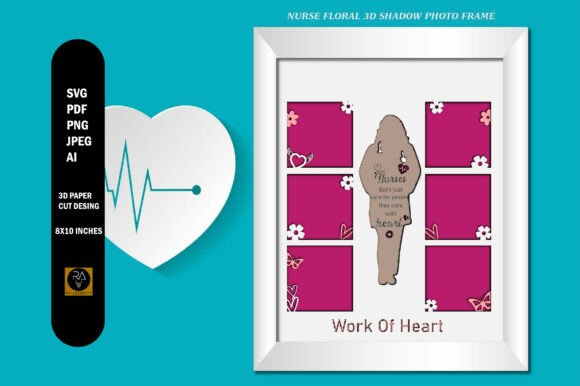
Nurse Floral 3D Shadow Box Photo Frame
In the landscape of digital design and physical craft production, the transition from a conceptual idea to a tangible final product requires precise planning and high-quality assets. For creators, small business owners, and hobbyists alike, the efficiency of this workflow often hinges on the versatility of the source files used. The Nurse Floral 3D Shadow Box Photo Frame represents a specialized asset designed to streamline this process, offering a structured template that bridges the gap between digital precision and physical aesthetics. By understanding how this template functions within a broader creative or commercial workflow, users can significantly reduce preparation time while maintaining high standards of quality control.
Understanding the Asset Structure
At its core, the Nurse Floral 3D Shadow Box Photo Frame is not merely an image; it is a multi-layered architectural blueprint for a physical object. The template consists of 5 distinct layers, each serving a specific function in the assembly of the final shadow box. This layering system is critical for anyone utilizing cutting machines like Cricut or Silhouette, as well as for designers preparing files for print-on-demand services. The dimensions are standardized at Height 10 inches by Width 8 inches, providing a consistent canvas that fits well within standard framing constraints and material sheets.
The complexity of a 3D shadow box lies in the depth and separation of its elements. A single-layer JPEG cannot convey the spatial relationships required for assembly. Instead, this template provides the necessary structural data to create depth. When integrated into a design software environment, these layers allow the user to assign different materials—such as cardstock, foam board, or vinyl—to specific components, ensuring that the final physical output matches the intended visual hierarchy. This structure supports a workflow where digital accuracy directly translates to physical stability.
File Format Compatibility and Workflow Integration
One of the most significant factors in efficient project execution is file compatibility. The Nurse Floral 3D Shadow Box Photo Frame is delivered in five specific formats: SVG, AI, PNG, PDF, and JPEG. Each format serves a distinct role in the production pipeline, allowing users to select the appropriate tool based on their specific stage in the process.
- SVG Vector Files: These are the primary workhorses for cutting workflows. As vector graphics, they offer unlimited resizing without quality loss. This is essential when scaling designs for different frame sizes or adjusting elements to fit specific material constraints. SVGs retain the editable paths needed for layer separation, making them indispensable for laser cutters and vinyl plotters.
- PNG Raster Files: Provided at 300 ppi, these high-resolution raster images are ideal for printing purposes. If you are sending your design to a professional printing service or using it as a reference guide during manual assembly, the PNG ensures that every floral detail remains crisp and clear. They are also useful for temporary placement previews in design software before committing to cuts.
- AI and PDF: These formats cater to users who require deeper editing capabilities within Adobe Illustrator or those who need a universally compatible document for sharing with collaborators. The AI file allows for complex path modifications, while the PDF serves as a robust backup that preserves vector data across different platforms.
- JPEG: Included for quick visualization and low-fidelity sharing, the JPEG is suitable for initial concept reviews but should not be used for final production due to resolution limitations.
By receiving all these formats, users avoid the friction of converting files mid-project. This readiness allows for immediate implementation, whether the next step involves loading a machine, emailing a client for approval, or archiving the asset for future use.
Practical Implementation in Creative Projects
The application of the Nurse Floral 3D Shadow Box Photo Frame extends beyond simple decoration. It fits naturally into various professional and personal workflows, particularly in sectors involving personalized gifts, healthcare appreciation events, or educational displays.
Pre-Production Planning
Before any physical cutting begins, the digital setup phase is crucial. Users should import the SVG file into their preferred design software. Here, the five layers must be organized logically. A common best practice is to group layers by material type or cutting order. For instance, the background floral elements might be cut from a heavier cardstock, while the inner photo frame border could be a contrasting color. Proper organization at this stage prevents errors during the cutting process and simplifies the sorting of cut pieces later.
Material Selection and Testing
Efficiency in production relies heavily on material choice. Because the template includes detailed floral motifs, delicate lines may require adhesive-backed materials to hold their shape during assembly. However, thicker materials provide better structural integrity for the 3D effect. A practical tip is to run a test cut on scrap material to verify that the blade depth is correct for the chosen thickness. This step minimizes waste and ensures that the intricate details of the nurse-themed floral design remain intact.
Assembly and Quality Control
Once the pieces are cut, the assembly process becomes a methodical exercise in alignment. The 3D nature of the shadow box means that spacing between layers is just as important as the design itself. Using spacers or double-sided foam tape can help maintain consistent depth. During this phase, quality control involves checking for clean cuts, ensuring no paper fibers are torn, and verifying that the layers stack correctly without interfering with one another. The final result should be a cohesive piece where the floral elements frame the central photo space elegantly.
Commercial and Educational Use Cases
For entrepreneurs and small business owners, this template offers a scalable solution for product creation. Nurses are a dedicated demographic often celebrated during National Nurses Week, retirement parties, or end-of-year appreciation events. A professionally crafted shadow box adds perceived value to a gift, distinguishing it from mass-produced items. By mastering the workflow associated with this digital asset, creators can produce limited-edition runs quickly, responding to market demand without significant overhead.
Educators and mentors can also utilize this resource in workshops teaching digital fabrication. The clear layer structure makes it an excellent case study for explaining concepts like z-indexing, vector vs. raster, and material properties. Students learn not just how to cut, but how to plan a multi-dimensional object from a two-dimensional file.
Long-Term Value and Organization
Digital assets are most valuable when they are easily retrievable and reusable. Keeping the original Nurse Floral 3D Shadow Box Photo Frame files organized in a dedicated folder structure ensures that they can be accessed for future projects. Since the SVG format allows for unlimited resizing, a design created today can be adapted for a larger display tomorrow. Furthermore, because the images are provided without watermarks in their original state, there is no degradation in quality over time, preserving the integrity of the design for long-term commercial use.
Integrating this template into your workflow requires attention to detail and an understanding of how digital layers translate to physical space. However, the result is a streamlined process that yields high-quality, professional-looking products. By leveraging the full suite of file formats and respecting the structural requirements of the five-layer design, users can achieve consistent, efficient outcomes that meet both creative aspirations and practical demands.