Tiger 3D Layered Animal Laser Cut File
The market for digital crafting assets has expanded significantly, offering creators a wide array of tools to produce intricate physical goods. Among these resources, the Tiger 3D Layered Animal Laser Cut File stands out as a specialized vector asset designed for laser cutting enthusiasts and professional makers alike. This digital product provides the necessary data to create multi-dimensional wall art featuring a tiger, utilizing depth and shadow to achieve a realistic, three-dimensional effect without the need for complex modeling software.
For individuals researching digital cut files, understanding the technical specifications, material compatibility, and practical applications is essential before making a purchase. This evaluation explores the features, benefits, and considerations associated with this specific design, helping readers determine if it aligns with their creative goals and equipment capabilities.
Understanding the Product Structure
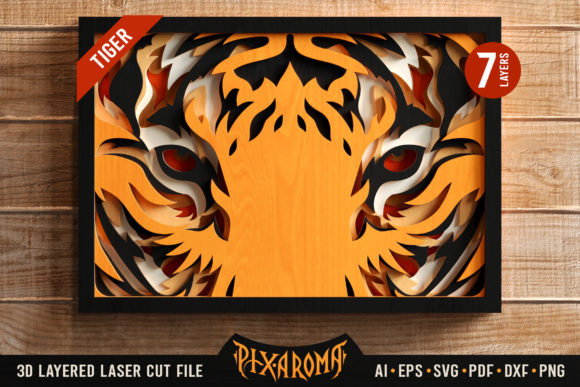
A layered laser cut file differs from standard single-plane designs by breaking the image into distinct horizontal slices. Each slice represents a cross-section of the final object, allowing layers to be stacked and adhered together to create depth. The Tiger 3D Layered Animal Laser Cut File utilizes a seven-layer structure. This number of layers strikes a balance between visual complexity and assembly time, providing enough detail to capture the tiger’s form while remaining manageable for most hobbyist and semi-professional setups.
The product is delivered as a comprehensive ZIP file containing multiple file formats to ensure broad compatibility. These include:
- Vector Formats: SVG, PDF, AI, EPS, and DXF. These are crucial for precision cutting on machines that rely on vector paths.
- Raster Formats: JPG and PNG. These are useful for reference, previewing the design in graphic editing software, or for users who prefer to trace manually.
In addition to the raw cut data, the package includes color combination ideas and a quick assembly guide. These supplementary materials are particularly helpful for beginners who may not be familiar with the techniques required to stack and glue thin layers accurately.
Technical Compatibility and Machine Requirements
One of the primary advantages of this digital file is its compatibility with a wide range of CO2 laser machines. The vector data is optimized for popular devices such as Glowforge, K40, Beamo, Flux, Epilog, Atomstack, and OmTech. However, users must ensure their hardware can handle the intricacies of the design.
While the file supports various scaling options, there are technical limitations to consider. Scaling down the design too aggressively can result in fine details becoming indistinguishable or failing to cut entirely. Similarly, reducing the size may cause thinner shapes to break during the cutting process or fail to adhere properly during assembly. It is generally recommended to keep the design at or near its original intended scale to maintain structural integrity and visual clarity.
Material Considerations and Aesthetic Outcomes
The success of a 3D layered project relies heavily on material selection. The Tiger 3D Layered Animal Laser Cut File is versatile enough to work with several substrates, each offering a different aesthetic finish:
- Cardstock and Paper: Ideal for practice runs or smaller decorative pieces. Cardstock allows for clean cuts and easy gluing but may lack the durability for long-term display in high-traffic areas.
- Plywood and MDF: These wood-based materials provide a natural, warm look that enhances the organic theme of the tiger. Plywood offers strength, while MDF provides a smooth surface for consistent cutting. Note that darker woods may require staining or painting to highlight the contrast between layers.
- Acrylic and Plexiglass: For a modern, sleek appearance, acrylic can be used. Clear or colored acrylic layers can create a striking light-diffusing effect, especially when backlit. However, acrylic requires precise focus settings on the laser to avoid melting or charring the edges.
- Plastic and Other Synthetics: Certain plastics can be cut effectively, though users should verify safety guidelines regarding fumes produced during laser cutting.
The choice of material also influences the color strategy. Since the design relies on layering, using contrasting colors for different layers can enhance the 3D illusion. Alternatively, using a single material with varying thicknesses or applying paint after assembly can yield a monochromatic yet dimensional result.
Evaluating Benefits and Tradeoffs
Adopting the Tiger 3D Layered Animal Laser Cut File offers several distinct benefits. First, it democratizes complex design; users do not need advanced CAD skills to create a sophisticated piece of wall art. The pre-calculated layers save significant time compared to designing the geometry from scratch. Second, the inclusion of commercial use rights allows makers to sell physical versions of the artwork, turning a hobby into a potential revenue stream. This is a significant advantage for small business owners looking to expand their inventory with unique, nature-themed decor.
However, there are tradeoffs to consider. The assembly process for seven layers can be tedious. Aligning each layer perfectly requires patience and precision. Misalignment can distort the tiger’s features, reducing the overall impact of the artwork. Additionally, the final product is fragile; the thin layers of wood or paper can be susceptible to warping or damage if not handled carefully or sealed properly.
Another consideration is the learning curve. While the assembly guide helps, achieving professional-grade results often requires practice. Beginners may experience initial failures, which can be discouraging. It is advisable to test the file on scrap material before committing to expensive substrates like high-grade plywood or acrylic.
Situational Fit: Who Should Use This File?
This product is best suited for laser cutting enthusiasts who have access to compatible machinery and some experience with assembly techniques. It is an excellent fit for:
- Home Decor Enthusiasts: Individuals looking to add unique, personalized art to their living spaces or offices.
- Small Business Makers: Sellers on platforms like Etsy or local craft fairs who want to offer handmade, 3D animal art.
- Educators and Students: Those teaching principles of vector graphics, laser cutting, and assembly in a practical context.
Conversely, this file may not be ideal for those seeking instant gratification or those without laser cutting equipment. Digital-only users who do not intend to produce physical objects will find limited value in a product that requires manufacturing. Furthermore, users with older or less powerful laser machines might struggle with the finer details of the tiger’s eyes and fur patterns, resulting in blurred or incomplete cuts.
Conclusion and Final Recommendations
The Tiger 3D Layered Animal Laser Cut File is a robust resource for creating visually striking wall art. Its multi-format delivery ensures compatibility with most modern laser cutters, and the seven-layer design offers a compelling balance of detail and manageability. By providing clear assembly instructions and commercial rights, the product supports both personal projects and entrepreneurial ventures.
Before purchasing, readers should assess their machine’s precision capabilities and their own comfort level with layered assembly. If you have the right tools and patience, this file offers a rewarding path to creating professional-quality 3D animal art. For those new to laser cutting, starting with cardstock to master the alignment technique is highly recommended before moving to more permanent materials.